Pad Printing vs Screen Printing: What's the Difference?
Oct 23, 2026
The main difference is simple: pad printing uses a flexible silicone pad to transfer an image onto a product, while screen printing pushes ink directly through a mesh stencil. Pad printing is generally better suited to small graphics on complex or recessed surfaces. Screen printing is often more practical for larger designs, solid-color coverage, and flat or cylindrical products.
For manufacturers, however, surface shape is only the starting point. Ink adhesion, print size, registration accuracy, production speed, tooling, and operating costs also affect the decision. This comparison explains where each process works best and how to evaluate equipment before purchasing.

Pad Printing vs Screen Printing: Quick Comparison
| Factor | Pad Printing | Screen Printing |
|---|---|---|
| Ink transfer | Indirect transfer through a silicone pad | Direct transfer through a mesh stencil |
| Surface compatibility | Small, irregular, curved, or moderately recessed areas | Flat, cylindrical, and selected shaped surfaces |
| Print coverage | Usually better for smaller graphics | Often better for larger graphics and solid areas |
| Image detail | Suitable for fine markings on small components | Suitable for detailed designs and larger graphics |
| Multicolor printing | Multiple plates, pads, and printing stations | Multiple screens and registered printing stations |
| Common applications | Buttons, caps, electronics, automotive parts | Bottles, containers, panels, plastic crates |
| Main limitations | Large solid areas and extreme surface geometry | Complex recesses and surfaces that cannot maintain printing contact |
| Cost and speed | Depend on machine configuration and production requirements | Depend on machine configuration and production requirements |
These are general process characteristics, not absolute equipment limits. Specialized machinery can extend the range of products either method can handle. The final choice should be confirmed using representative samples and the required artwork.
How Do Pad Printing and Screen Printing Work?
How Pad Printing Transfers Ink
In pad printing, an image is etched into a printing plate called a cliché. Ink fills the engraved areas, and a sealed ink cup or doctor blade removes excess ink. A silicone pad picks up the image and presses against the product to release it.
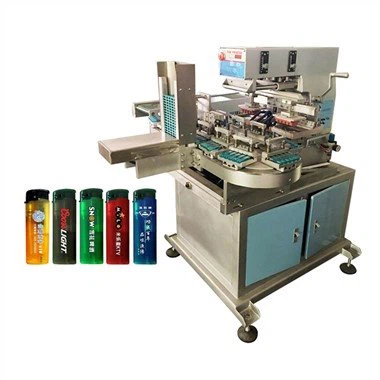
The pad's flexibility allows it to conform to moderately curved or uneven surfaces. This is why industrial pad printing machines are frequently used for molded plastic parts and components with small printing areas.
Successful transfer depends on more than pad flexibility. The pad must roll across the image without trapping air or creating excessive distortion. Its shape, hardness, compression, and contact angle affect the result. Suppliers can select different silicone pad shapes and materials to suit particular products.
Ink viscosity also matters. If the ink dries too quickly in the plate, the pad may fail to collect the complete image. If it does not release correctly, the print can appear incomplete or blurred.
How Screen Printing Transfers Ink
Screen printing uses a mesh screen containing a stencil of the artwork. A squeegee moves across the screen and forces ink through the open mesh areas onto the substrate.
Unlike pad printing, the screen transfers ink directly. Mesh characteristics, stencil thickness, squeegee pressure, printing speed, and ink formulation influence coverage and image quality.
Industrial screen printing machines are not limited to flat materials. For cylindrical products, a specialized fixture rotates the container while the screen moves in synchronization with its surface.
FESPA's technical overview of screen printing mechanisms explains the importance of the stencil, mesh, squeegee, and contact between the printing system and substrate.

Which Method Is Better for Curved and Irregular Surfaces?
Product geometry is often the clearest reason to choose one method over the other.
Pad Printing for Complex Three-Dimensional Parts
Consider a plastic control button with a domed surface and a small operating symbol. A silicone pad can compress against the curved area, making image transfer relatively straightforward.
Pad printing can also accommodate parts that require printing at several angles. For example, a servo-controlled rotary pad printer can reposition a component between printing operations.
However, flexibility has limits. Deep recesses, sharp shoulders, steep changes in curvature, and unsupported thin-walled products can prevent uniform contact. The pad may also stretch or compress parts of the artwork.
If the printed symbol must maintain precise dimensions, a trial should check distortion at the center and edges of the image rather than inspecting appearance alone.
Screen Printing for Flat and Cylindrical Products
Screen printing works particularly well when a product presents a stable printing surface. Flat panels are relatively straightforward, while round containers can be printed using controlled rotation.
An automatic cylindrical screen printing machine can synchronize container movement with the printing stroke to reproduce artwork around a curved surface.
Problems arise when the product's shape prevents consistent contact. An oval or tapered bottle may require a customized fixture and a suitable motion program. A conventional cylindrical setup should not be assumed to work on every non-round container.
Selection principle: For a small logo on a complicated molded part, start by evaluating pad printing. For a large design around a cylindrical bottle, evaluate screen printing first.

Print Size, Image Quality, and Multicolor Registration
Why Pad Printing Has Limitations with Large Graphics
Pad printing can reproduce fine details, but transferring a broad solid-color area is more demanding. The silicone pad must collect and release ink consistently over the entire image. Large contact areas increase the risk of uneven transfer, distortion, and incomplete coverage.
The available printing area depends on the plate, pad, machine stroke, and product geometry. There is no universal maximum size applicable to all pad printers.
Why Screen Printing Often Suits Larger Designs
Screen printing can deposit ink across relatively large areas without transferring the artwork through a deforming silicone pad. This makes it attractive for broad logos, decorative bands, and designs requiring strong solid-color coverage.
The actual result still depends on mesh selection, stencil construction, squeegee settings, and ink. A larger printable area does not automatically guarantee greater precision.
Which Process Is Better for Multiple Colors?
Both methods can print multiple colors, but maintaining registration becomes more demanding as the number of colors increases.
Pad printing systems use separate plates and printing stations. Topper's TP-250C6S six-color button pad printer, for example, incorporates automatic feeding, positioning, multicolor printing, drying, and unloading.
Multicolor screen printing uses separate screens and registration controls. For cylindrical packaging, errors in bottle positioning or rotational synchronization can shift the relationship between printed colors.
When evaluating either process, examine repeated samples from a continuous production run. A perfect first sample does not prove that registration will remain stable throughout a shift.
Ink Adhesion and Durability: Which Lasts Longer?
Neither printing process is inherently more durable on every material. Adhesion depends primarily on the interaction between the substrate, ink, surface preparation, and curing conditions.
For example, untreated polyethylene (PE) and polypropylene (PP) are challenging because their low surface energy can make ink wetting and adhesion difficult.
Depending on the selected ink, flame treatment, corona treatment, plasma treatment, or a compatible primer may be necessary. Marabu's technical guidance on pad printing inks and additives explains how viscosity, pretreatment, and material compatibility affect print performance. Its screen printing ink guidance identifies similar challenges with polyolefin substrates.
Before selecting a process, define the conditions the finished print must withstand:
- Handling and abrasion during production and transportation
- Cleaning agents or chemical exposure during use
- Heat, moisture, and environmental aging
- Adhesion to the actual molded or coated material
- Any application-specific regulatory or customer requirements
For suitable coating systems, ISO 2409:2020 describes a cross-cut test for assessing resistance to coating separation. It does not directly measure adhesive strength, and the method must be appropriate for the material and coating being evaluated.
Testing should use production-representative substrates, printing conditions, and curing times. Passing a visual inspection immediately after printing is not sufficient evidence of long-term durability.
Pad Printing vs Screen Printing: Production Speed and Automation
It is misleading to say that pad printing is always faster than screen printing, or vice versa. The number of products printed per hour depends on the complete production line.
For example, Topper publishes the following specifications for two different machines:
| Specification | TP-250C6S Pad Printer | TS-2030S2 Screen Printer |
|---|---|---|
| Typical application | Buttons and small components | Glass and plastic bottles |
| Configuration | Six-color printing system | Two printing stations |
| Published maximum speed | 1,000 pieces/hour | 400 pieces/hour |
| Handling | Automatic feeding and unloading | Servo-controlled bottle handling |
These are manufacturer-published equipment specifications, not results from a controlled comparison. The machines print different products using different configurations. Their advertised speeds cannot establish which printing method is faster for the same job.
The TS-2030S2 specification is available on Topper's automatic glass bottle screen printer page.
Calculate Accepted Production Output
A useful starting point is:
Accepted output = Actual gross output × Acceptance rate
For example, suppose a line produces 800 parts per hour under normal working conditions, and 97% pass inspection. Its accepted output is approximately 776 parts per hour.
If the machine requires frequent fixture adjustments or color changes, total output over an eight-hour shift may be lower still.
When comparing automatic pad printing systems with automatic screen printing lines, request production data using the same assumptions: artwork complexity, number of colors, acceptable quality level, and operating time.
Which Printing Process Costs Less?
The purchase price is only one part of the cost. Both methods involve tooling, consumables, setup, maintenance, and labor.
Pad printing commonly requires engraved plates, silicone pads, ink cups or doctor blades, and product fixtures. Screen printing requires prepared screens, mesh, squeegees, fixtures, and potentially larger drying or curing equipment.
For frequent product changes, setup time can be significant. A relatively inexpensive machine may become costly if operators must repeatedly replace tooling and readjust alignment.
Example: Comparing Cost per Accepted Part
Consider a hypothetical production job in which both processes have already been shown to meet the same technical requirements. The following numbers are illustrative, not Topper equipment quotations or measured production results.
| Cost Factor | Pad Printing Option | Screen Printing Option |
|---|---|---|
| Parts attempted | 20,000 | 20,000 |
| Acceptance rate | 98% | 96% |
| Allocated fixed and setup costs | $1,000 | $1,300 |
| Variable cost per attempted part | $0.05 | $0.04 |
| Total calculated cost | $2,000 | $2,100 |
| Cost per accepted part | Approximately $0.102 | Approximately $0.109 |
The calculation divides total production cost by the number of accepted parts. Changing the batch size, setup cost, production yield, or equipment utilization could reverse the result.
For an actual quotation comparison, use supplier-confirmed equipment costs and trial production data rather than assuming that either method is consistently cheaper.
Which Method Is Best for Different Products?
Small Caps and Molded Buttons: Usually Pad Printing
Small logos on bottle caps, electronic buttons, and molded controls are common pad printing applications. The required image is usually compact, and the product can be held in a dedicated fixture.
For high-volume cap decoration, an automatic cap pad printer can incorporate feeding, positioning, printing, and unloading. PP or PE versions may also require surface pretreatment.

Cosmetic Bottles: Often Screen Printing
A cylindrical cosmetic bottle may require large branding graphics, decorative bands, or multicolor artwork around the container. Screen printing is often the stronger candidate when the bottle can be rotated consistently through the printing stations.
A dedicated cosmetic bottle screen printer may incorporate servo positioning, registration sensors, and UV curing according to its configuration.
Plastic Crates: Usually Screen Printing
Reusable plastic crates often need larger identification marks or logos on one or more side panels. These surfaces can make screen printing practical, particularly when the line uses controlled crate rotation and dedicated fixtures.
Topper's automatic plastic crate screen printing system combines printing stations with options such as flame pretreatment, material handling, and drying.
Irregular Automotive and Electronic Parts: Often Pad Printing
Small symbols on curved switches, buttons, and molded housings are generally good candidates for pad printing. However, printing feasibility still depends on available contact space, positioning stability, and ink compatibility.
These examples are application-based recommendations, not verified customer test results. Unusual product shapes or quality requirements should be evaluated through sample printing.
Common Printing Defects and Their Causes
Understanding possible defects helps buyers assess process risks before committing to equipment.
| Problem | More Common Considerations | What to Check |
|---|---|---|
| Distorted graphics | Pad compression or part geometry | Pad shape, contact angle, artwork compensation |
| Incomplete ink transfer | Pad printing ink pickup or release | Ink viscosity, plate condition, pad cleanliness |
| Uneven solid areas | Screen deposit or pad transfer inconsistency | Ink condition, pressure, stencil or pad selection |
| Multicolor misregistration | Both printing processes | Fixture repeatability, station alignment, rotation control |
| Poor adhesion | Both printing processes | Material, contamination, pretreatment, ink and curing |
For example, if a printed logo consistently appears stretched on a curved button, changing the ink may not solve the issue. Pad geometry, compression, and artwork compensation should be investigated first.
If a cylindrical bottle shows progressive color misalignment, check fixture slippage, rotational synchronization, and registration settings before assuming that the screen stencil is defective.
How to Choose the Right Printing Machine
Use the following checks before requesting a machine quotation or approving a production process.
- Confirm product geometry. Measure the printable surface and identify curves, recesses, draft angles, and positioning features.
- Define the artwork. Specify print dimensions, colors, minimum line widths, coverage, and registration tolerance.
- Identify the substrate. Include resin grade, coating information, surface treatment, and known contamination risks.
- Set quality requirements. Define acceptable appearance, adhesion, durability, and any applicable test methods.
- Calculate production demand. Provide required accepted parts per shift, batch size, changeover frequency, and expected operating hours.
- Request a sample printing trial. Test representative products using suitable inks, fixtures, and production settings.
- Compare complete equipment solutions. Include feeding, curing, changeover, maintenance, operator requirements, and total production costs.
For sample testing, send enough identical products to evaluate repeatability, not just one display sample. Where possible, include the actual production material and final artwork rather than a similar substitute.
A useful supplier evaluation should identify not only which process works, but also what conditions make it reliable and which limitations remain.
Frequently Asked Questions
Is pad printing the same as screen printing?
No. Pad printing transfers ink indirectly through a flexible silicone pad. Screen printing deposits ink directly through a mesh stencil. Their different transfer mechanisms affect product compatibility, coverage, tooling, and setup.
Can screen printing be used on curved surfaces?
Yes. Specialized cylindrical screen printing machines can print on round bottles, cups, and other suitable containers. Oval, tapered, or irregular products may require customized rotation and positioning systems.
Which method produces more durable prints?
Neither is universally more durable. Ink compatibility, surface preparation, curing, and the product's operating conditions are usually more important than the printing method alone.
Can pad printing handle large designs?
Some specialized pad printers can handle relatively large images, but broad solid-color areas may create transfer and distortion challenges. The practical limit should be established using the actual equipment, artwork, and substrate.
Which printing process is better for high-volume manufacturing?
Both can support automated production. The better option depends on product shape, number of colors, cycle time, feeding method, curing requirements, and accepted output. Compare real trial data rather than unrelated machine speed ratings.
Can the same equipment print different product sizes?
Often yes, within the machine's operating range. Different products may require new fixtures, adjusted printing parameters, replacement pads or screens, and revised motion programs. Changeover requirements should be confirmed before ordering.
Conclusion: Pad Printing or Screen Printing?
Pad printing is generally the better starting point for small graphics on irregular or recessed components. Screen printing is often preferable for larger designs on flat or cylindrical surfaces, particularly where extensive color coverage is required.
Neither method should be selected on shape alone. Image quality, adhesion, registration, automation, production yield, and total cost all influence the final decision.
The most dependable approach is to test the actual product and artwork before specifying the production machine.
Find the Right Printing Equipment for Your Product
Topper Printing provides industrial pad printing and screen printing equipment for applications such as bottle caps, molded components, cosmetic packaging, glass bottles, and plastic containers.
Send your product photographs, dimensions, material information, artwork, number of colors, and required production capacity. Our team can review your application and discuss suitable machine configurations and sample printing requirements.
Contact Topper Printing to Request a Printing Test or Machine Quotation