

How to load ink into an Automatic Pad Printer?
Jan 19, 2026
Loading ink into an automatic pad printer is a crucial process that significantly impacts the quality of printing. As a reliable supplier of Automatic Pad Printers, we understand the nuances of this procedure and are here to guide you through every step.
Understanding the Basics of Automatic Pad Printing
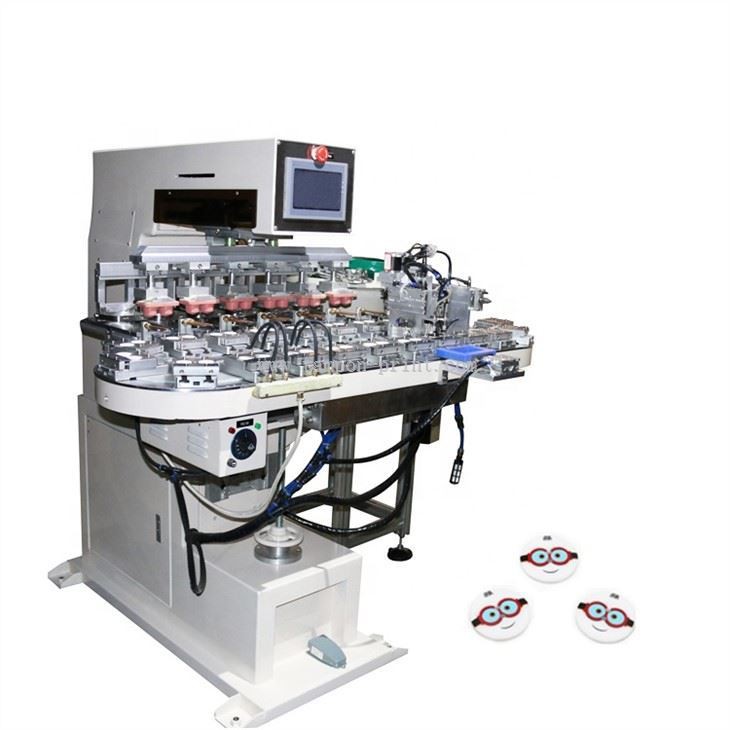
Before delving into the ink - loading process, it's essential to have a basic understanding of how an automatic pad printer works. An automatic pad printer uses a silicone pad to pick up ink from a printing plate and then transfer it onto the substrate. This process is repeated continuously, allowing for high - speed and consistent printing. There are various types of automatic pad printers available on the market, such as the Automatic Caps Pad Printing Machine, The Pad Printers, and Automatic Buttons Ink Cups Pad Printing Machine. Each machine has its own specific design and functionality, but the general ink - loading principle remains largely the same.
Required Materials and Safety Precautions
Materials
- Ink: Select the appropriate ink based on the substrate material. For example, if you're printing on plastic, you'll need a plastic - compatible ink. Different inks also have different drying times and viscosities, so choose one that suits your production requirements.
- Ink cup: The ink cup holds the ink and distributes it evenly on the printing plate. Make sure the ink cup is clean and in good condition before use.
- Cleaning supplies: Have isopropyl alcohol or a dedicated ink - cleaning solution on hand, along with lint - free rags. These will be used for cleaning the printing plate and ink cup.
- Stirring stick: Used to stir the ink and ensure a uniform consistency.
Safety Precautions
- Ventilation: Ensure that the area where you're loading the ink is well - ventilated. Inhaling ink fumes can be harmful to your health.
- Personal protective equipment (PPE): Wear gloves and safety goggles to protect your hands and eyes from ink contact.
- Fire safety: Some inks are flammable. Keep away from open flames and ensure that there are appropriate fire - prevention measures in place.
Step - by - Step Guide to Loading Ink
Step 1: Prepare the Printing Area
First, clean the entire printing area, including the printing plate, ink cup, and silicone pad. Use isopropyl alcohol and a lint - free rag to remove any dust, debris, or old ink. Ensure that the printing plate is dry before proceeding.
Step 2: Prepare the Ink
Open the ink container and stir the ink thoroughly with a stirring stick. Over time, the pigments in the ink can settle, so stirring ensures a consistent color and viscosity throughout the ink. If the ink is too thick, you may need to add a small amount of ink thinner. However, be careful not to add too much, as this can affect the printing quality.
Step 3: Fill the Ink Cup
Place the ink cup on a clean surface. Pour the stirred ink slowly into the ink cup. Do not overfill the ink cup; leave some space at the top to prevent spillage. The amount of ink you pour depends on the size of the ink cup and the printing job. For longer printing runs, you may need to fill the ink cup more fully.
Step 4: Install the Ink Cup
Carefully install the filled ink cup onto the automatic pad printer. Make sure it is properly seated and aligned with the printing plate. The ink cup should move smoothly across the printing plate during the printing process.
Step 5: Prime the Printer
Before starting the actual printing, it's important to prime the printer. This involves running a few test cycles without the substrate. During these test cycles, the silicone pad picks up ink from the printing plate and transfers it away. This process helps to ensure that the ink is evenly distributed on the printing plate and that the printer is functioning correctly.
Step 6: Check the Ink Level
Periodically check the ink level in the ink cup during the printing process. If the ink level gets too low, the printing quality may deteriorate. You can refill the ink cup as needed using the same procedure as before.
Step 7: Adjust the Ink Viscosity if Necessary
As the printing process progresses, the ink viscosity may change due to evaporation. If you notice that the printing quality is decreasing, such as faded colors or incomplete transfers, you may need to adjust the ink viscosity. Add a small amount of ink thinner or solvent to the ink in the ink cup and stir well.
Troubleshooting Common Ink - Loading Issues
Inconsistent Printing
If you experience inconsistent printing, such as some areas of the print being lighter or darker than others, it could be due to uneven ink distribution on the printing plate. Check if the ink cup is moving smoothly and evenly across the printing plate. You may also need to clean the printing plate and re - prime the printer.
Ink Splattering
Ink splattering can occur if the ink cup is overfilled or if the printing speed is too high. Reduce the ink level in the ink cup and adjust the printing speed to a more appropriate setting.
Poor Ink Transfer
Poor ink transfer may be caused by a dirty or worn - out silicone pad. Clean the silicone pad with a mild detergent and dry it thoroughly. If the pad is severely worn, it may need to be replaced.
Maintaining the Ink System
Regular maintenance of the ink system is essential for the long - term performance of your automatic pad printer. After each printing job, clean the ink cup and printing plate thoroughly to prevent ink build - up. Replace the ink regularly, especially if it has been sitting in the ink cup for an extended period.

Conclusion
Loading ink into an automatic pad printer is a process that requires attention to detail and proper technique. By following the steps outlined in this guide and taking the necessary safety precautions, you can ensure high - quality printing results. As a leading supplier of automatic pad printers, we are committed to providing you with the best equipment and support. If you have any questions or need further assistance with ink loading or any other aspect of pad printing, feel free to contact us for a purchase negotiation. We look forward to helping you achieve your printing goals.
References
- Industry standards for pad printing inks and equipment.
- Manufacturer's manuals for automatic pad printers.